

What if your task system didn’t depend on remembering everything or having the same energy every day? If your to-do list keeps growing, big tasks feel hard to start, or a strict routine stops working when your attention shifts, you’re not failing at planning. Your system may be asking you to hold too much in your head. This ADHD task management guide starts with a more supportive approach: put tasks somewhere you can return to, then make the next step clear and manageable.
You’ll learn how to capture tasks in one trusted place, turn broad goals into specific next actions, and choose priorities without treating everything as urgent. You’ll also create a simple review habit that can flex when your focus or energy changes. The aim isn’t a perfect planner or an unbroken streak. It’s a practical system you can return to after a busy day, a missed check-in, or a change of plans.
Key Takeaways
- An ADHD task management guide can help you create a reliable place to capture tasks, so fewer details depend on memory.
- Turn broad goals into clear next actions to make it easier to see where to begin.
- Choose paper, digital, or a mix based on your routine, including how you use reminders and keep tasks visible.
- Choose a small set of priorities for today while keeping other tasks easy to find for later.
- If your system becomes hard to maintain, use a brief reset to simplify it and make it easier to return to.
ADHD Task Management: Why Standard To-Do Lists Are Hard
A to-do list can look simple and still be difficult to use. It fills with reminders, broad goals, and tasks you meant to start yesterday. Then an item slips your mind, or you open the list and can’t tell what to do first. That isn’t proof that you’re lazy or don’t care. A list can ask you to remember, sort, begin, and follow through without making each step clear.
ADHD task management means moving tasks out of your head and making the next action easy to see. This can reduce what you need to remember and give you a clear place to restart when your attention shifts. The practical goal is to make tasks visible and workable, rather than expect yourself to push through a vague or crowded list.
Why a task can feel difficult even when it matters
Remembering a task, deciding its priority, starting it, and switching to something else are different demands. A task can stall at any one of them. Executive function refers to mental skills involved in organizing and directing actions; ADHD can affect these skills differently from person to person. For a broader overview, see Understanding ADHD and its impact on executive functions.
Consider an appointment reminder that says, “Schedule a checkup.” It names the goal but leaves several steps unstated: find the clinic’s number, check your calendar, make the call, and record the appointment. If the first action isn’t obvious, the task may stay on the list even though the appointment matters. Naming the steps makes the work easier to see. People with ADHD have different experiences, so this task or strategy won’t apply to everyone.
What an ADHD-friendly task system should make easier
A useful system doesn’t need to be elaborate. It should help you do three things:
- Capture: Put tasks in one trusted place so you’re less reliant on remembering them later.
- Clarify: Write the next visible action, such as “Call the clinic to ask about appointments,” rather than only “Checkup.”
- Review: Choose a realistic time to look at the list, update it, and decide what to do next.
An ADHD-friendly task system is a simple external reminder that makes the next step visible and gives you an easy way back when plans change.
Keep the setup low-friction. If maintaining categories, tags, and daily routines takes more effort than the list saves, simplify it. Missing a review doesn’t erase your progress; return when you can and choose one next action. This is educational information, not a clinical diagnosis or individualized medical advice. The goal is a system that supports your working style, not a test of whether you can follow a perfect routine.
Build an ADHD task management system by capturing and breaking down tasks
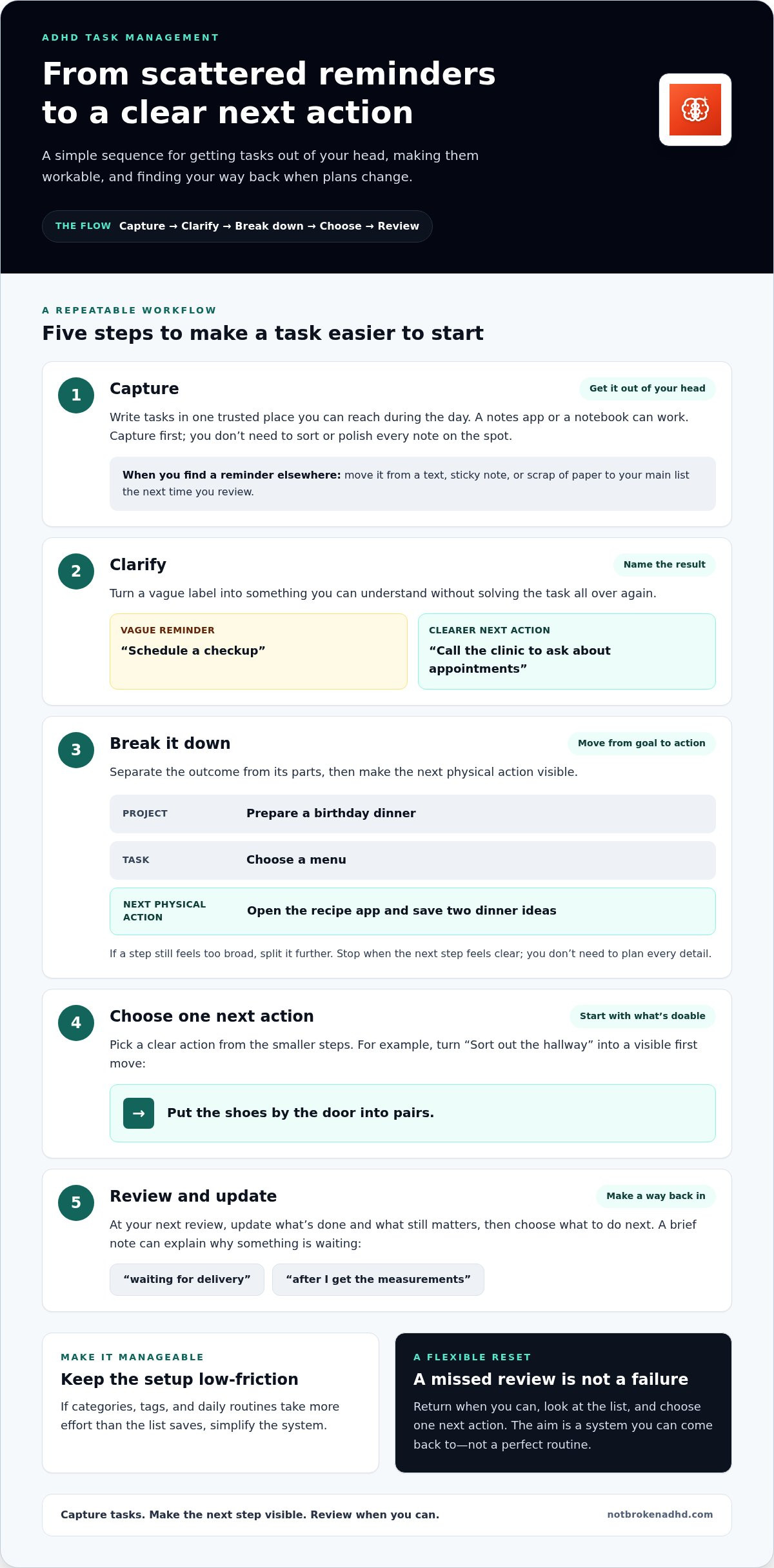
A reliable system starts with getting tasks out of your head, not organizing them perfectly. Choose one primary place to capture tasks that you can reach during your day, such as a notes app on your phone or a notebook by your desk. When a task comes to mind, write it down quickly. You don’t need to sort or polish every note on the spot.
Later, transfer stray reminders from texts, sticky notes, or scraps of paper into that trusted list. Keep the rule simple: when you find a task somewhere else, move it to your main list the next time you review. This makes it easier to find what needs doing without searching several places.
Turn a broad goal into a next action
Once you’ve captured a task, clarify what it means and how to begin. Separate it into three levels:
- Project: A result that takes several actions, such as “Prepare a birthday dinner.”
- Task: One part of the project, such as “Choose a menu.”
- Next physical action: A visible step you can do, such as “Open the recipe app and save two dinner ideas.”
The next action should be specific enough that you don’t have to figure out the task all over again before starting. If “Choose a menu” still feels too broad, break it down further: check who’s coming, choose a main dish, then list the ingredients. Stop when the next step feels clear; you don’t need to plan every detail.
Use a short sequence to keep tasks workable
Try this simple flow: capture, clarify, break down, choose a next action, review. For example, capture “Sort out the hallway.” Clarify the result you want: make space for coats and shoes. Break it into smaller tasks, such as “Clear the shoe rack” and “Find a place for spare bags.” Choose one action to start: “Put the shoes by the door into pairs.” At your next review, update the list based on what’s done and what still matters.
Some steps depend on other people or events. Keep those tasks visible without creating a complicated tracking system. Add a brief note such as “waiting for delivery” or “after I get the measurements.” This explains why the task isn’t ready to move forward and keeps it separate from actions you can do now.
Task organization draws on executive function skills, including planning and follow-through. For more context, read this executive functioning guide. For more practical learning on ADHD and executive function, explore ADHD educational resources.
Choose a paper, digital, or hybrid ADHD task management method
The best format is the one you can find and use in your actual routine. A notebook can keep today’s priorities in view, while a digital list can make tasks easier to search or remind you about recurring responsibilities. A hybrid approach can combine both. Choosing a format isn’t about finding a perfect app or planner. Notice what helps you see tasks and what creates extra friction.
| Format | Strengths | Possible friction | May suit you if… |
|---|---|---|---|
| Paper | Visible at a glance; quick to write in without opening a device. | Pages can get misplaced, and reminders aren’t automatic. | You like a physical list and usually work near your notebook or planner. |
| Digital | Portable, searchable, and able to support recurring reminders or calendar views. | Notifications may distract, and setup can become a task of its own. | Your phone or computer is already part of your daily routine. |
| Hybrid | Combines a visible daily list with a searchable place for larger projects. | Tasks can get out of sync if you don’t decide which format holds the main record. | You want a focused view for today and a separate home for future tasks. |
When a paper task list may fit
A paper list can stay open beside your work, making tasks easy to see without switching screens. Quick capture can also feel straightforward: write a reminder down and return to what you were doing. The trade-off is that paper can’t reliably prompt you about a deadline, and loose pages are easy to lose. Keep the layout simple, with space to add, cross off, or carry forward tasks after a missed day. You can also explore these printable ADHD management tools if a ready-to-use paper format feels easier to start with, or review an ADHD-friendly daily routine checklist to anchor your day.
When digital or hybrid tools may fit
Digital lists can help when you need to find an old note, repeat a task, or view commitments alongside your calendar. Set notifications intentionally: keep reminders that prompt useful action, and turn off or adjust alerts that distract without helping. A hybrid system might keep today’s active tasks on paper and longer-term projects digitally. Choose one place as the main record so tasks don’t disappear between formats.
Try the simplest version that fits your day before adding features. If setup takes more effort than using the list, scale it back. The right format should make tasks easier to notice, not give you another system to manage.
Turn your ADHD task list into a realistic plan for today
A useful daily plan isn’t a promise to finish everything. It helps you choose what deserves your attention now while keeping other tasks visible for later. Start by sorting tasks into three loose groups:
- Time-sensitive: Tasks with a real deadline or consequence if delayed.
- Important but flexible: Tasks that matter but can move to another day.
- Optional: Tasks you’d like to do if you have capacity.
Choose a manageable handful based on the time and energy you actually have. If several items seem equally urgent, ask which has the clearest next action or would make another task easier. Pick a starting point, not a perfect order. Keep the rest of the list available so you don’t have to worry about losing track of it.
Prioritize without turning the list into a test
Leave room between planned tasks for transitions, interruptions, and basic needs. Switching activities can take effort, so a schedule packed edge to edge may be hard to follow even when each time estimate seems reasonable. Estimate a range instead of an exact duration, then adjust future estimates based on what you notice. The point is to learn what fits your routine, not to measure your worth by how much you complete.
If an item stays unfinished, treat that as useful information. It may need a smaller first step, more time, or a different place in the plan. Carry it forward, revise it, or decide it can wait. An unfinished task is a cue to replan, not proof that you’ve failed.
Use time supports without making the plan rigid
A timer can make starting feel more contained: choose a defined work interval, focus on one next action, and pause when the interval ends to check in. A Pomodoro-style timer gives you a clear beginning and stopping point, but it can’t guarantee focus or productivity. Use it as optional structure, not another rule to meet.
At the end of an interval, take a short break or reset that helps you return to the next action. You might stretch, get water, or pause away from the task, then check your list before moving on. If a timer interrupts useful focus, adjust it or skip it. For another flexible planning aid, see the ADHD-friendly daily routine checklist. You can also try the ADHD-focused Pomodoro timer as a time-support tool alongside your task list.
Review and reset your ADHD task management system when it stops fitting
A task system is meant to support you, not become another project to maintain. A brief review gives you a chance to clear visual clutter, notice what has changed, and make the next step easier to find. It doesn’t need to happen every day or follow a perfect schedule. Choose a realistic time to review, then return to the habit when you can.
A short weekly reset for unfinished tasks
Keep the review contained. Look through open tasks and decide what each needs now: act on it, schedule it for a realistic time, delegate it if appropriate, or remove it if it no longer matters. Clear completed items, update what’s time-sensitive, and choose a clear next action for tasks you’re keeping.
Notice patterns without turning the review into self-criticism. Does a task keep stalling because its steps are unclear? Are you waiting for information or someone else’s response? Did you allow less time than the work needed? A short note can explain the delay and help you plan the next step. The aim is to make the list useful again, not reorganize every detail.
When to simplify or change the system
Notice what you use with little effort and what repeatedly creates friction. Maybe you check your task list but avoid adding categories, or you miss reminders because there are too many. Keep the helpful part and reduce the rest. If upkeep takes more energy than the system saves, try one small adjustment, such as removing a category or keeping fewer tasks in your daily view. Changing one feature at a time makes it easier to tell whether the change helps.
Consistency doesn’t mean using your system flawlessly every day. It means having a way to return after a busy stretch, a missed review, or a change in routine. Start with one small reset: clear completed items, choose what matters now, and make one next action visible. That’s enough to begin again.
This ADHD task management guide is about building a system that can adapt with you. For more ideas to support planning and focus, explore ADHD guides and focus tools.
Build a task system you can return to
A supportive task system doesn’t need to hold every detail perfectly or work the same way each day. Capture tasks in a trusted place, turn larger goals into clear next actions, and choose a format that fits your real routine. Then make a manageable plan for today, leaving room for transitions and changes in energy.
The key is having a way back. A missed review or unfinished task isn’t a reason to abandon your system. Use it as a cue to clear what’s done, adjust what matters, and choose one next step. This ADHD task management guide is a starting point, not a demand for perfect consistency.
For practical support as you shape your approach, The ADHD Field Guide offers downloadable ADHD and executive function guides, an ADHD Self-Check Tool, interactive simulations, and a built-in Pomodoro timer. Explore ADHD guides and focus tools at a pace that works for you. Start small, adjust as you learn, and remember that returning counts as progress.
Frequently Asked Questions
What is the best task management method for ADHD?
There isn’t one method that works best for everyone. A helpful ADHD task management guide centers on a system you can access easily, trust to hold reminders, and return to without a lot of setup. That might be a notebook, a digital list, or both. Look for a method that makes tasks visible and next steps clear, then adjust it if managing the system takes more effort than it saves.
How do you break down tasks with ADHD?
Start by naming the result you want, then list the steps needed to get there. Keep dividing a step until the first action is specific and observable, such as opening a document or gathering materials. If something depends on another person or event, note what you’re waiting for. You don’t need to plan every detail in advance. Make the next step clear enough to begin, then review and add detail as needed.
Why do I make to-do lists but still not complete tasks?
A list can record what needs doing without showing how to start, what matters first, or how long the work may take. Remembering, prioritizing, beginning, and switching between tasks all require different kinds of effort. If an item stays unfinished, it may need a clearer next action, more realistic space in your day, or information you’re still waiting for. That’s useful feedback for adjusting the plan, not a measure of how much you care.
How many tasks should I put on my daily ADHD list?
There’s no fixed number that suits every day. Choose a small, realistic set of priorities after considering your existing commitments, energy, and transition time. Keep other tasks in a separate ongoing list so they remain visible without crowding today’s plan. If your chosen tasks repeatedly carry over, reduce the daily list or break the work into smaller actions. The aim is a workable starting point, not a quota to complete.
Are digital planners or paper planners better for ADHD?
Neither format is automatically better. Paper can keep today’s actions visible and make quick notes easy, while digital planners can offer search, calendar views, and reminders. A hybrid system might store longer-term projects digitally and keep a short daily list on paper. Consider what you already reach for during your routine. Choose one main place to hold tasks, and keep reminders intentional so they support attention rather than interrupt it.
Can a Pomodoro timer help with ADHD task management?
A Pomodoro-style timer can help define a starting point and work interval, making a task feel more contained. Before starting, choose one clear action to work on; when the timer ends, pause and decide whether to continue, take a short break, or reset. A timer is an optional support, not a guarantee of focus or productivity. The ADHD Field Guide includes a Pomodoro timer designed to support focus.
How do I restart my task system after falling behind?
Restart with a short reset, not a full reorganization. Clear completed items, review what’s still open, and decide whether to act, schedule it, delegate it, or remove it. For anything you keep, name one next action and note blockers such as missing information. Simplify any part of the system that feels hard to maintain. You don’t need to catch up perfectly; returning and choosing a next step is enough to restart.


